android Service
默认UI线程生命周期
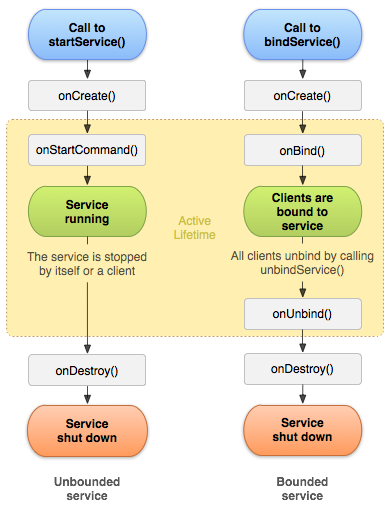
- onCreate() 创建
调用startService()或bindService()而该Service未创建
- onStartCommand() 启动
调用startService()
多次请求开启service会导致相应的多次调用service的onStartCommand()。然而,只需要一次停止service(使用stopSelf() 或 stopService())请求就可以停止它
- 返回
- START_NOT_STICKY
如果系统在onStartCommand()返回后杀死了service,系统不会重新创建service,除非传递的是挂起的intent。这是一个安全的选项避免运行你的service当没必要并且当你的应用程序可以重启所有未完成的任务。
- START_STICKY
如果系统在onStartCommand()返回后杀死了service,系统会重新创建service并且调用onStartCommand(),但不会重新分发最后的intent。而是系统会使用一个null的intent调用onStartCommand(),除非这是被挂起的intent启动的service,这种情况下,这些intent会被传递。这适用于媒体播放器(或相似的service)不是执行命令,但无限的运行并且等待一个任务。
- START_REDELIVER_INTENT
如果系统在onStartCommand()返回后杀死了service,系统会重新创建service并且用分发到service的最后的intent调用onStartCommand()。所有被挂起的intent都会被依次传递。这适用于一个service正在执行一个应该立即被恢复的任务,例如下载一个文件。
- START_NOT_STICKY
- onBind() 绑定
调用bindService()
- onDestroy()
调用stopService()和相应次数unbindService()
自身调用stopSelf()
IntentService 单线程执行 onHandleIntent()
- 创建一个默认的工作线程执行所有从主线程分发到onStartCommand()的intent
- 创建一个工作队列每次仅通过一个intent到达onHandleIntent()
- 所有请求处理完成后自动停止service
- 提供一个默认onBind()的实现返回null
- 提供一个默认onStartCommand()的实现发送intent到工作队列然后发送到onHandleIntent()
- 如果重写其它的方法,例如onCreate(), onStartCommand(), 或 onDestroy(),确保调用父类的实现
public class HelloService extends Service {
  private Looper mServiceLooper;
  private ServiceHandler mServiceHandler;

  // Handler that receives messages from the thread
  private final class ServiceHandler extends Handler {
      public ServiceHandler(Looper looper) {
          super(looper);
      }
      @Override
      public void handleMessage(Message msg) {
          // Normally we would do some work here, like download a file.
          // For our sample, we just sleep for 5 seconds.
          long endTime = System.currentTimeMillis() + 5*1000;
          while (System.currentTimeMillis() < endTime) {
              synchronized (this) {
                  try {
                      wait(endTime - System.currentTimeMillis());
                  } catch (Exception e) {
                  }
              }
          }
          // Stop the service using the startId, so that we don't stop
          // the service in the middle of handling another job
          stopSelf(msg.arg1);
      }
  }

  @Override
  public void onCreate() {
    // Start up the thread running the service.  Note that we create a
    // separate thread because the service normally runs in the process's
    // main thread, which we don't want to block.  We also make it
    // background priority so CPU-intensive work will not disrupt our UI.
    HandlerThread thread = new HandlerThread("ServiceStartArguments",
            Process.THREAD_PRIORITY_BACKGROUND);
    thread.start();

    // Get the HandlerThread's Looper and use it for our Handler
    mServiceLooper = thread.getLooper();
    mServiceHandler = new ServiceHandler(mServiceLooper);
  }

  @Override
  public int onStartCommand(Intent intent, int flags, int startId) {
      Toast.makeText(this, "service starting", Toast.LENGTH_SHORT).show();

      // For each start request, send a message to start a job and deliver the
      // start ID so we know which request we're stopping when we finish the job
      Message msg = mServiceHandler.obtainMessage();
      msg.arg1 = startId;
      mServiceHandler.sendMessage(msg);

      // If we get killed, after returning from here, restart
      return START_STICKY;
  }

  @Override
  public IBinder onBind(Intent intent) {
      // We don't provide binding, so return null
      return null;
  }

  @Override
  public void onDestroy() {
    Toast.makeText(this, "service done", Toast.LENGTH_SHORT).show();
  }
}
绑定通信
- Binder内部类 定义被activity调用的方法
- onBind 返回Binder
- ServiceConnection onServiceConnected()绑定时调用,传入返回的Binder
public class MyService extends Service {

    private MyBinder mBinder = new MyBinder();

    @Override
    public void onCreate() {
        super.onCreate();
    }

    @Override
    public int onStartCommand(Intent intent, int flags, int startId) {
        return super.onStartCommand(intent, flags, startId);
    }

    @Override
    public void onDestroy() {
        super.onDestroy();
    }

    @Override
    public IBinder onBind(Intent intent) {
        return mBinder;
    }

    class MyBinder extends Binder {

        public void startDownload() {
            Log.d("MyService", "startDownload() executed");
            // 执行具体的下载任务
        }

    }

}

public class MainActivity extends Activity{

    private MyService.MyBinder myBinder;

    private ServiceConnection connection = new ServiceConnection() {

        @Override
        public void onServiceConnected(ComponentName name, IBinder service) {
            myBinder = (MyService.MyBinder) service;
            myBinder.startDownload();
        }

        @Override
        public void onServiceDisconnected(ComponentName name) {
        }
    };

    @Override
    protected void onCreate(Bundle savedInstanceState) {

        Intent intent = new Intent(this, MyService.class);
        //startService(intent);
        //stopService(intent);
        bindService(intent, connection, BIND_AUTO_CREATE);
        //unbindService(connection);
    }
}
前台Service
public class MyService extends Service {

    private MyBinder mBinder = new MyBinder();

    @Override
    public void onCreate() {
        super.onCreate();
        Notification notification = new Notification(R.drawable.ic_launcher,
                "有通知到来", System.currentTimeMillis());
        Intent notificationIntent = new Intent(this, MainActivity.class);
        PendingIntent pendingIntent = PendingIntent.getActivity(this, 0,
                notificationIntent, 0);
        notification.setLatestEventInfo(this, "这是通知的标题", "这是通知的内容",
                pendingIntent);
        startForeground(1, notification);
    }

    .........

}
给用户发送通知
一旦运行,service可以使用 Toast通知Toast Notifications)或 状态条通知(Status Bar Notifications)通知用户事件。